Slack Opens Code Channels for Claude Code and Copilot
Slack launched code channels on 20 August 2026 so teams can watch coding agents plan, diff, and preview in the open. Claude, Devin, GitHub Copilot, and Vercel are live; ChatGPT is coming soon.

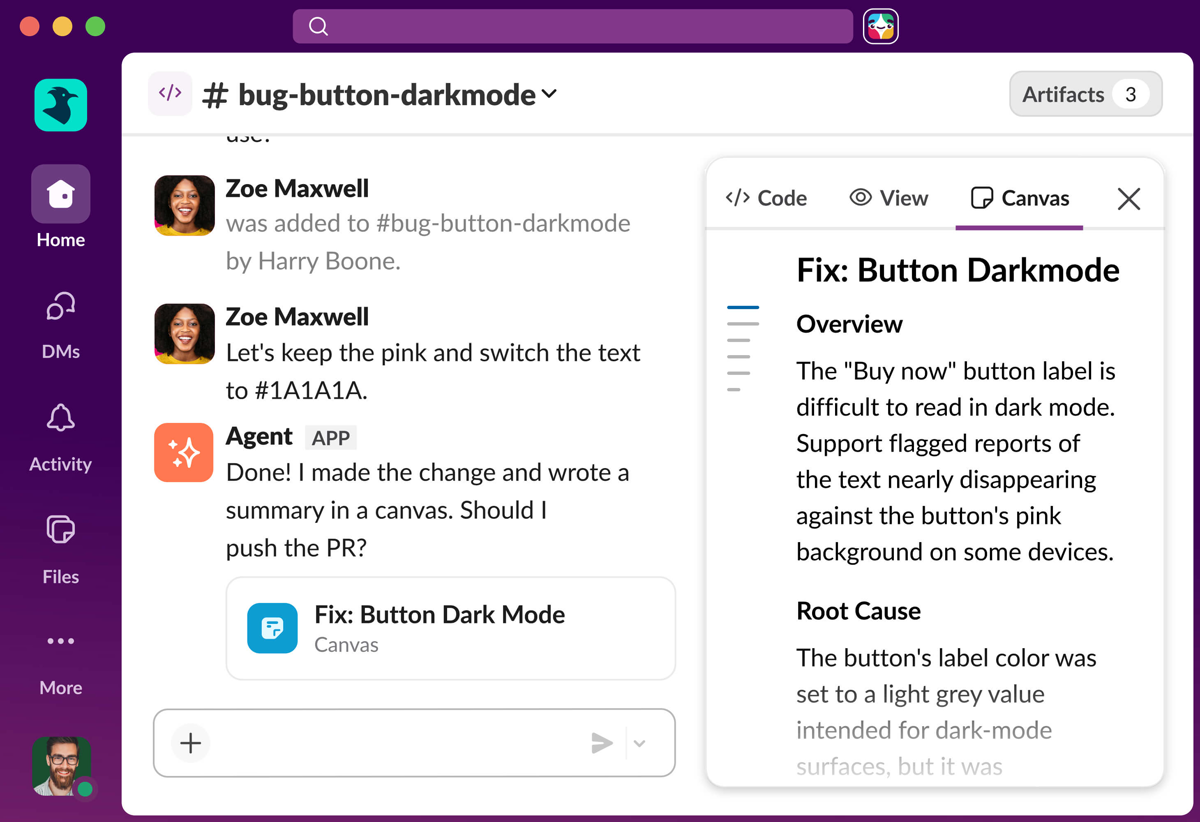
Slack launched dedicated code channels on 20 August 2026 so a team can watch a coding agent work in the open instead of a private tab. Slack’s announcement names launch partners Anthropic, Cognition, GitHub, OpenAI, and Vercel.
What Slack Shipped
Slack Code is a channel type that spins up when someone mentions a supported coding agent on real work. The channel can surface code diffs, planning notes, and live HTML previews as the agent runs. When the task finishes, Slack archives the channel but keeps it searchable.
Slack says code channels inherit existing workspace permissions and admin controls. High-stakes changes can route to a human for approval inside the channel.
Integrations live on launch day for Claude (Anthropic), Devin (Cognition), GitHub Copilot, and Vercel. OpenAI (ChatGPT) is listed as available soon.
Who Can Use It
Slack says code channels are available on any Slack plan. Each agent still needs its own product access. Mention Claude, Devin, GitHub Copilot, ChatGPT, or Vercel in a project channel to start a code channel.
GitHub’s 21 August changelog adds Copilot-specific detail. The @GitHub integration is in public preview for GitHub Copilot Business and Enterprise organizations. Usage draws from existing Copilot entitlements and existing cloud-agent budgets.
An administrator must enable the Copilot cloud agent policy, install or upgrade the GitHub app for Slack, and link a GitHub account before @GitHub can run in a conversation. Inside a code channel, Copilot can plan changes, investigate failures, open pull requests, and post links back to the Slack thread. Repository administrators can require an extra approval before Copilot-attributed pull requests merge.
What Changes for Coding Agents in Slack?
Most teams already run coding agents in Slack from a private browser tab or an @mention that dumps diffs into a thread. Slack built code channels after its own engineers said multi-turn agent work broke that pattern. Threads felt cramped and solo tabs hid the work from the team.
Slack Code does not replace those @mentions. Mentioning a supported agent on real work can spin up a dedicated code channel scoped to that task. The agent’s plan and the diffs land in that room instead of as a long text dump in the parent thread. When the job finishes, the channel archives automatically but stays searchable as an audit log.
That is a visibility and layout change. You still need access to Claude, Devin, GitHub Copilot, or Vercel on their respective products. Slack is providing the shared workspace around the run.
How Code Channels Differ from a Regular Mention
A normal @mention keeps the whole exchange inside the channel or thread you started in. For a quick question, that is fine. For a multi-step fix, the same thread mixes the original bug report with planning notes, code diffs, preview links, and side comments from anyone who wandered in.
Slack’s announcement describes code channels as a dedicated space per project, visible to the whole team. Anthropic’s launch blurb there says Claude Tag can invoke a code channel as a separate home for the work so it does not get lost in a thread. Teammates can follow a summary posted back to the original conversation and jump into the code channel to steer.
GitHub’s path follows the same split. You can mention @GitHub in a DM, channel, or thread for an agent session, or let Copilot create a code channel that keeps the task focused without adding noise to the original conversation. Inside that channel, the team can follow the plan, inspect diffs, review HTML previews, and iterate before anyone approves a pull request.
The practical difference is room and permanence. A code channel keeps the plan and the preview in dedicated tabs, because a regular thread just gets longer. Regular @mentions still work; code channels are what Slack spins up when the work outgrows them.
I still @mention Claude in a normal channel for a one-line question. I would only want a code channel when the run is going to produce a plan and a diff.
What It Means
The pitch is shared agent work: the request, the plan, the diff, and the review stay visible to the team that filed the bug or shaped the requirement. Slack built the feature after its own engineers hit the limit of cramming multi-turn agent runs into standard threads.
That is a coordination problem in chat, not a replacement for IDE-first coding. For teams that already run releases from Slack, code channels move agent output into the same room as the humans who own the repo.
I still start work in Cursor with Claude Code and Codex. A Slack code channel is useful if the people who filed the ticket can see the plan and the diff without me pasting them.
Sources
- [1]
-
[2]
Slack's new code channels bring vibe coding to the workplace(theverge.com)
-
[3]
The new GitHub Copilot experience in Slack(github.blog)
Written by Bobby Smart
@mrbobbysmartRecent News
- Everything OpenAI Announced at DevDay 2026 Oct 1
- OpenAI Launches dots, Always-On ChatGPT Agents with Their Own Computers Sep 29
- Claude Opus 5.5 Claims Fable 5.1 Performance at 60% Lower Prices Sep 23
- OpenAI Releases GPT-6 Sol and Luna at Half GPT-5.6 Promo Prices Sep 23
- SpaceXAI Grok 4.7: Same $2/$6, Strong Cost-for-Performance on CursorBench Sep 22